> ## Documentation Index
> Fetch the complete documentation index at: https://docs.skybridge.tech/llms.txt
> Use this file to discover all available pages before exploring further.
# Audit
> Catch spec and platform issues before submission
Before a platform accepts your app, the server must conform to the MCP specs, and each platform layers its own requirements on top, which differ between [OpenAI](https://developers.openai.com/apps-sdk/app-submission-guidelines) and [Anthropic](https://claude.com/docs/connectors/building/submission). The Audit checks your app's conformance and performs end-to-end tests in real ChatGPT and Claude conversations, triggering [tools](/build/tools) and rendering [views](/build/view).
## Run the Audit
The Audit needs your server publicly reachable: start the [tunnel](/test/tunnel), then click **Audit** in the [DevTools](/test/devtools) header.
```bash npm theme={null}
npm run dev -- --tunnel
```
```bash pnpm theme={null}
pnpm dev --tunnel
```
```bash yarn theme={null}
yarn dev --tunnel
```
```bash bun theme={null}
bun dev --tunnel
```
```bash deno theme={null}
deno task dev --tunnel
```
The Audit is powered by [Alpic Beacon](https://docs.alpic.ai/testing/beacon). It can also be launched from [beacon.alpic.ai](https://beacon.alpic.ai) with your server's public URL, or via the [Alpic CLI](https://docs.alpic.ai/cli/tunnel).
## What It Checks
* **MCP protocol**: tool and resource conformance with the [official specification](https://modelcontextprotocol.io/specification/2025-11-25).
* **[MCP Apps](https://github.com/modelcontextprotocol/ext-apps/blob/main/specification/2026-01-26/apps.mdx)**: view resource requirements (metadata, Content Security Policy, annotations) for both ChatGPT and Claude.
* **Platform requirements**: each platform's own submission guidelines.
* **App behavior**: the app actually works, verified by triggering tools and rendering views in real ChatGPT and Claude conversations.
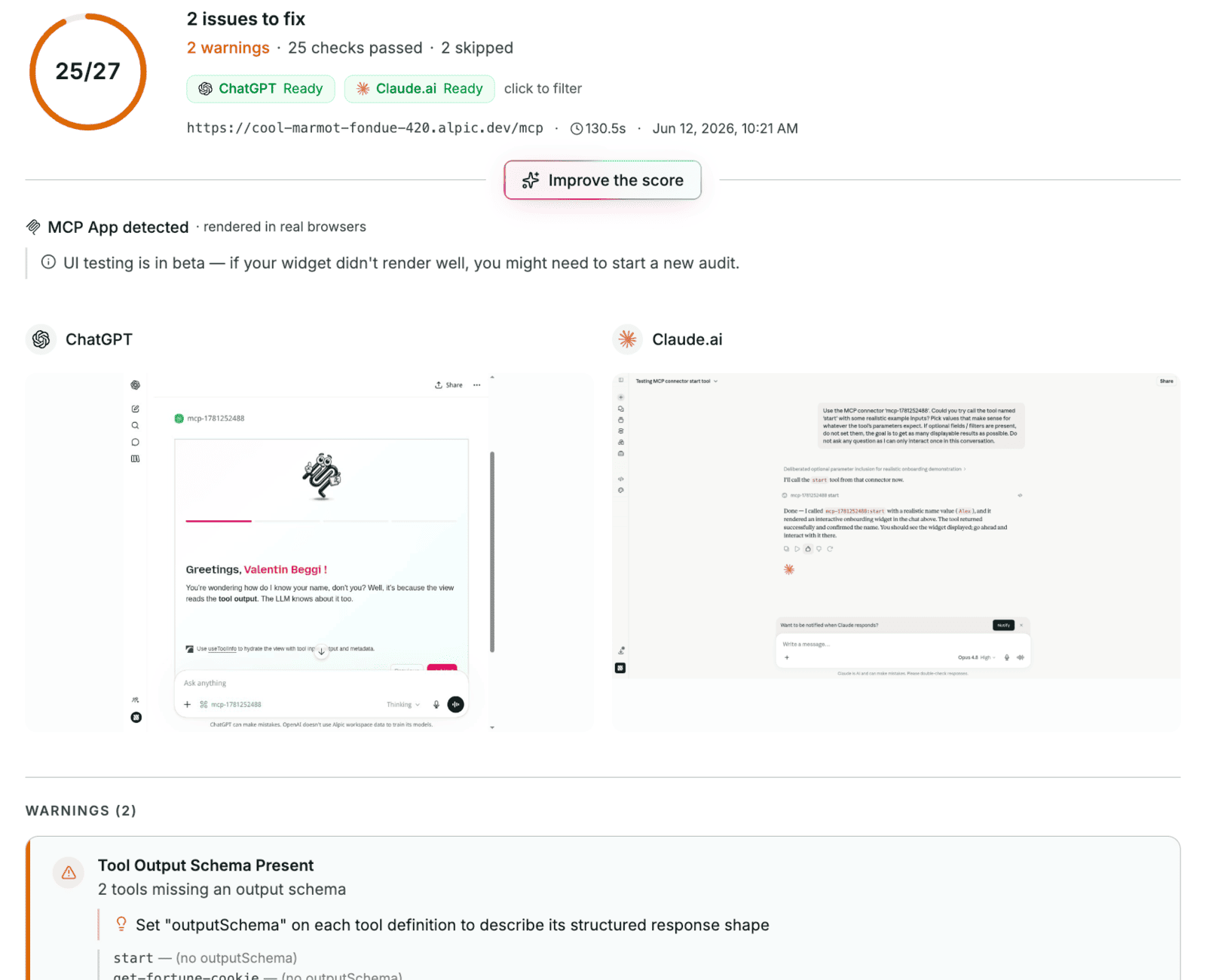 The report returns an overall score, a readiness status per platform, and the issues found, each with its severity (error, warning, info), the affected component, and the solution. **Improve your score** turns the report into a prompt for your coding agent to fix them all.
## Limitation
OAuth-protected servers aren't supported yet.
## Go Further
Call tools and render views locally, without a host
Expose your local server to real hosts
Chat with a real model running your app
The report returns an overall score, a readiness status per platform, and the issues found, each with its severity (error, warning, info), the affected component, and the solution. **Improve your score** turns the report into a prompt for your coding agent to fix them all.
## Limitation
OAuth-protected servers aren't supported yet.
## Go Further
Call tools and render views locally, without a host
Expose your local server to real hosts
Chat with a real model running your app