> ## Documentation Index
> Fetch the complete documentation index at: https://docs.skybridge.tech/llms.txt
> Use this file to discover all available pages before exploring further.
# Playground
> Chat with a real model running your app
Putting a real model in the loop normally means registering your app in a host. The Playground skips that: a chat wired to your local server, where a real LLM uses your [tools](/build/tools) and the [views](/build/view) render inline.
## Start the Playground
The Playground comes with the [tunnel](/test/tunnel). Start it with the `--tunnel` flag (or toggle **Tunnel** in the [DevTools](/test/devtools) header):
```bash npm theme={null}
npm run dev -- --tunnel
```
```bash pnpm theme={null}
pnpm dev --tunnel
```
```bash yarn theme={null}
yarn dev --tunnel
```
```bash bun theme={null}
bun dev --tunnel
```
```bash deno theme={null}
deno task dev --tunnel
```
Your local server becomes publicly available, and so does the Playground: it runs on the tunnel URL suffixed with `/try` (e.g., `https://cool-marmot-fondue-420.alpic.dev/try`). Anyone with the link can open it from any browser and chat with your app.
## Exercise the Model Loop
With a model in the loop, the prompt surface and the state sync become testable:
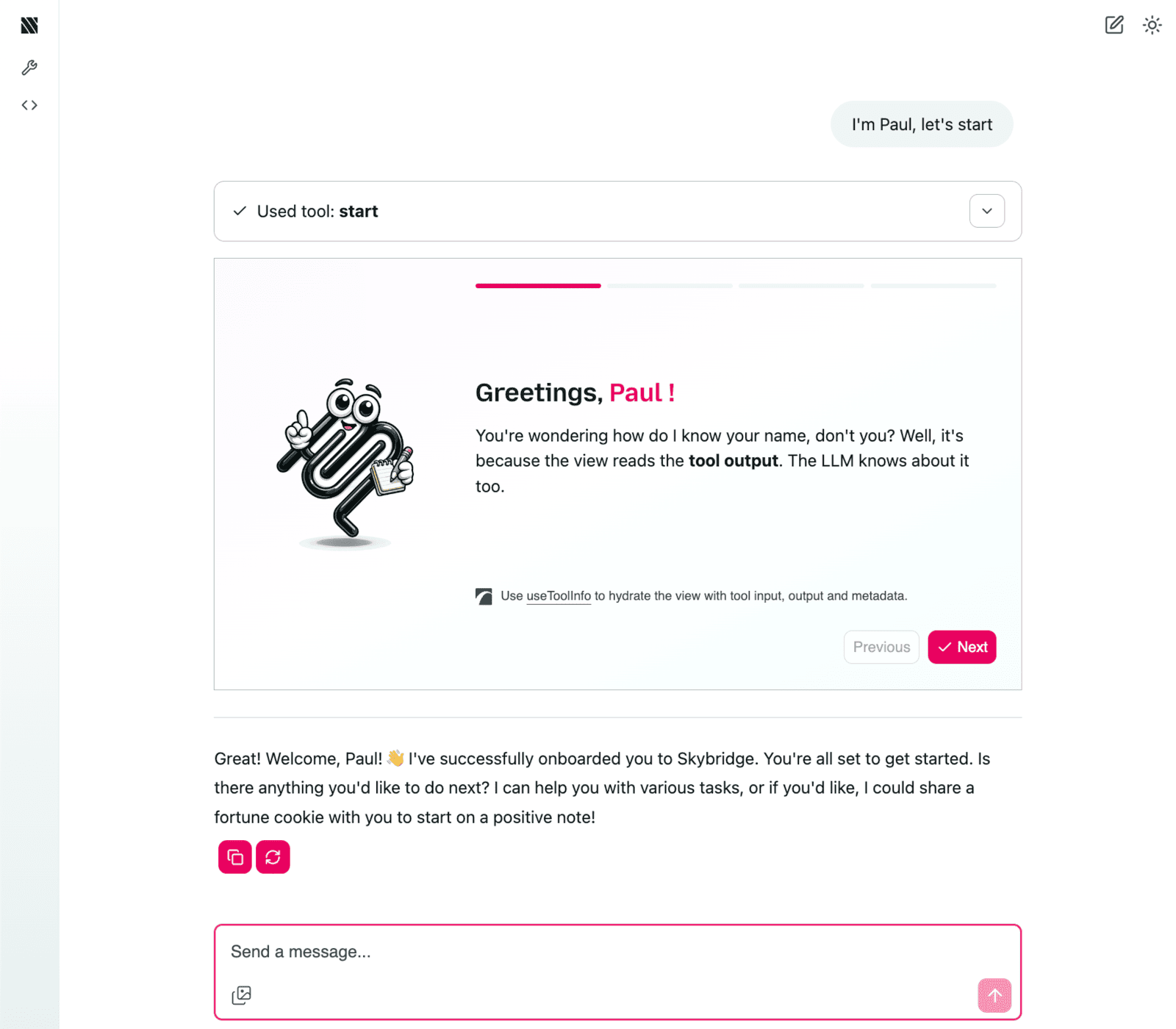 * **Tool selection**: assess what the model understands from your [tool names and descriptions](/api-reference/register-tool#name-title-description).
* **Argument filling**: check how it fills inputs from your [schemas](/api-reference/register-tool#inputschema-outputschema).
* **Narration**: see how it presents your tool [outputs](/api-reference/register-tool#return) in the conversation.
* **State**: verify what it picks up from the view [state](/build/state) on its next turn.
## Limitations
* Host specifics (model behavior, [state push policies](/build/state#decide-who-sees-what), view feature support) still need a real host: connect your app to ChatGPT and Claude using the [tunnel](/test/tunnel).
* The playground runs on [Alpic](https://docs.alpic.ai/distribution/playground): check the [host compatibility matrix](/api-reference/overview#hooks) for which hooks it supports.
## Go Further
Call tools and render views locally, without a host
Expose your local server to real hosts
Catch spec and platform issues before submission
* **Tool selection**: assess what the model understands from your [tool names and descriptions](/api-reference/register-tool#name-title-description).
* **Argument filling**: check how it fills inputs from your [schemas](/api-reference/register-tool#inputschema-outputschema).
* **Narration**: see how it presents your tool [outputs](/api-reference/register-tool#return) in the conversation.
* **State**: verify what it picks up from the view [state](/build/state) on its next turn.
## Limitations
* Host specifics (model behavior, [state push policies](/build/state#decide-who-sees-what), view feature support) still need a real host: connect your app to ChatGPT and Claude using the [tunnel](/test/tunnel).
* The playground runs on [Alpic](https://docs.alpic.ai/distribution/playground): check the [host compatibility matrix](/api-reference/overview#hooks) for which hooks it supports.
## Go Further
Call tools and render views locally, without a host
Expose your local server to real hosts
Catch spec and platform issues before submission