
.svg?fit=max&auto=format&n=XmT0L6B5SeC_y0ib&q=85&s=bab7c73944d030da24d76906d84af46f)
Start the Emulator
DevTools ships with the dev server. In a scaffolded project, start it from the project root:http://localhost:3000/mcp: your MCP serverhttp://localhost:3000/: the DevTools
Explore the Features
Select a tool in the sidebar and DevTools gives you the full exchange: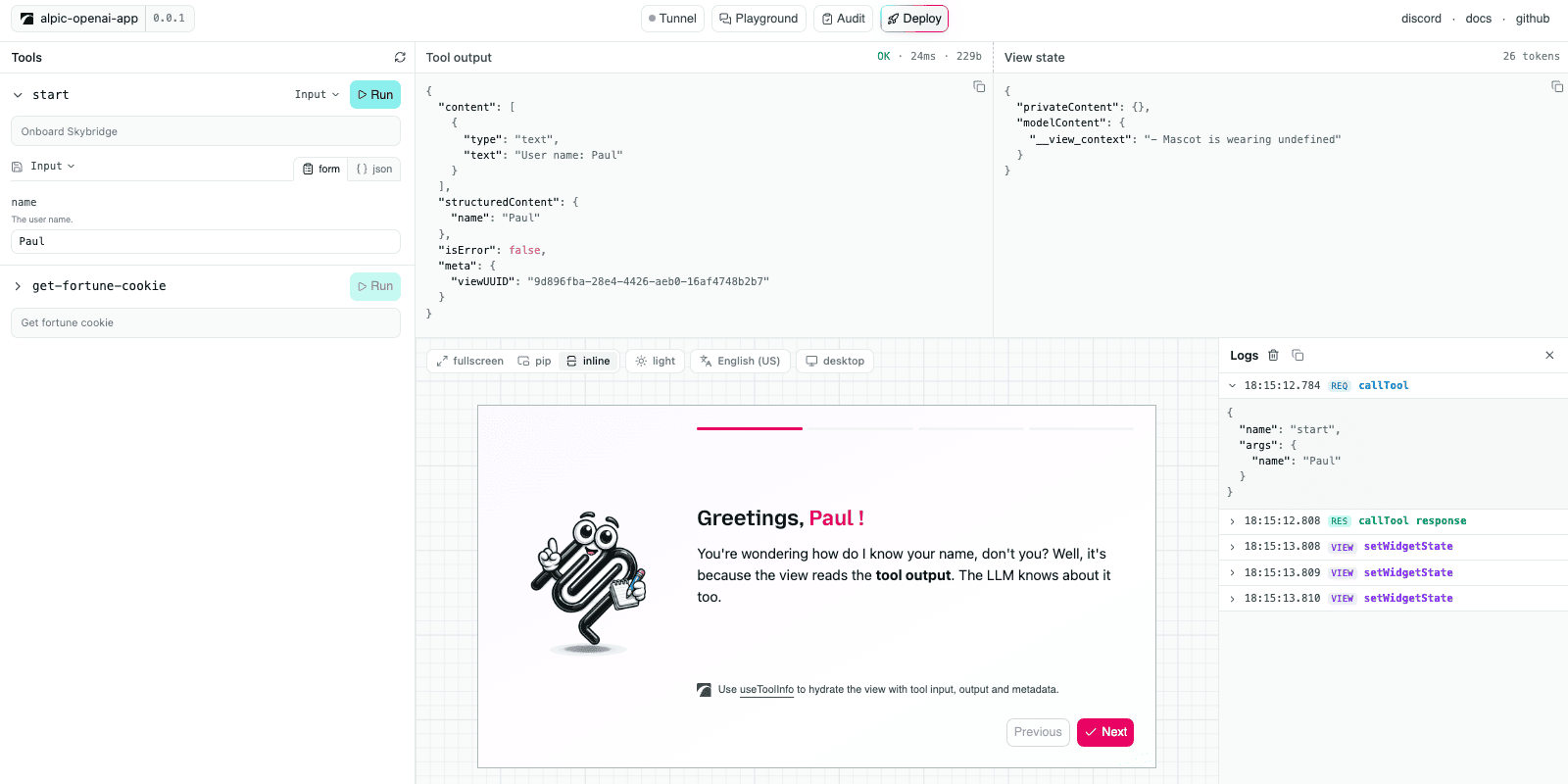
The DevTools interface
- Tool controls: generated from the tool’s input schema. Inputs can be saved and re-run from the tool header.
- Tool output: the raw server response (
content,structuredContent,_meta), with status, latency, and payload size. - State inspector: the view state as a JSON tree, updated as the view mutates it.
- View preview: the rendered View, with live controls to switch theme, locale, and device type; the preview updates immediately. The display mode is shown as a badge rather than a control, because only the view changes it, through
setDisplayMode. - Context warnings: a badge on the tool output and the view state when either grows large enough to crowd the model’s context, at 5,000 estimated tokens for tool output and 20,000 for view state. The same warning prints in the browser and dev server consoles. Nothing is blocked or truncated, and the full payload stays inspectable.
- Call logs: every runtime API call the view makes (
setViewState,callTool,requestDisplayMode) with its arguments and responses.
Preview in a Host Conversation
The panel tells you whether a view works. It does not tell you how the view looks once a host puts it in a conversation, next to a sidebar and under a thread of messages, which is where most layout surprises come from. Click preview in the toolbar and the panel becomes a mock conversation with your real view inside it. Everything around the view is a skeleton: sidebar, message thread, and a composer that does nothing.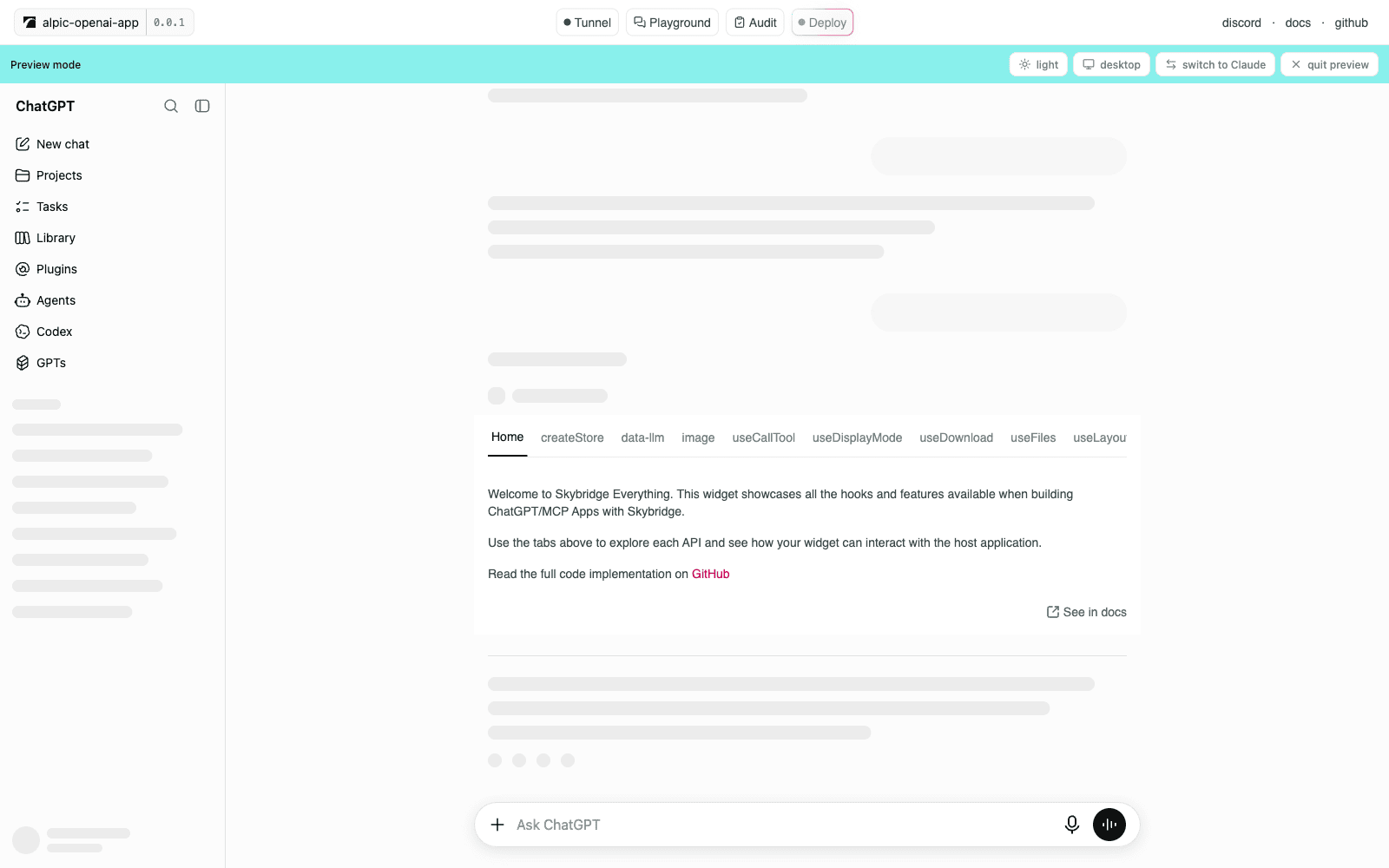
A view previewed in the ChatGPT conversation shell
- Switch client between ChatGPT and Claude. Each shell is measured against the real app, in light and dark, and the mode resets to inline when you switch.
- Toggle device to render the shell inside a 390 x 844 phone frame, with the mobile layout that client uses.
- Display modes follow what the selected client supports. Inline and fullscreen work everywhere, pip only on ChatGPT desktop, where it renders as a floating card. A
piprequest becomes fullscreen on ChatGPT mobile, and Claude keeps the current mode.- Quit preview returns to the panel with your tool state intact.
ui/initialize handshake carries that client’s own style variables, container dimensions, and available display modes, so a view that reads the host’s theme tokens themes itself the way it will in production.
The preview client is not persisted: reloading DevTools brings you back to the panel.
Drive DevTools from a Coding Agent
DevTools exposes its actions as WebMCP tools, so a coding agent that drives your browser runs them directly. The agent connects through chrome-devtools-mcp, an MCP server that discovers and calls a page’s WebMCP tools. On the DevTools page it can:- Run any registered tool and render its view in the preview.
- Read the rendered view by screenshotting the preview, then drive it as a real page.
- Switch the preview controls: theme, locale, and device. The display mode is not among them, since the view owns it.
Set It Up
1
Add chrome-devtools-mcp to your agent
Register the MCP server with the WebMCP flag, forwarding the browser feature flag to the Chrome it launches.
- Claude Code
- Codex
- Cursor
- Others

2
Start DevTools
Run
npm run dev and open the DevTools URL printed in the terminal.3
Prompt your agent
Open my app in DevTools, run a tool, and check the view renders
WebMCP is experimental and supported Chrome version 149 or newer.
Authenticated Servers
When your server requires OAuth, DevTools registers itself through Dynamic Client Registration on first connect and walks the full PKCE flow as a public client. A server that needs a pre-registered client or a different grant type won’t connect from DevTools. DevTools caches the authorization within the browser, so later sessions reconnect without prompting. To clear a cached registration, click Sign out in the header.Limitations
DevTools emulates, and three gaps separate the emulation from production:- No model: you pick the tool and type the arguments yourself. Tool selection, the prompt surface (names, descriptions, schemas), and follow-up messages are never exercised.
- Mocked runtimes: DevTools mocks the MCP Apps runtime and also injects a
window.openaishim for the Apps SDK, so an Apps SDK call that works here can still be host-specific in production. Host behaviour outside those mocks is not reproduced, and the conversation around a preview is a skeleton, not a working client. - Loose CSP: external resources blocked by hosts in production may load locally.
To test your app against a real LLM, use the playground or connect your server to ChatGPT or Claude using the tunnel.
Go Further
Tunnel
Expose your local server to real hosts
Playground
Chat with a real model running your app
Audit
Catch spec and platform issues before submission